| SpiritWars |
Quick Start Tutorial |
Page 5 |
|
|
The Healing Phase |
|||
|
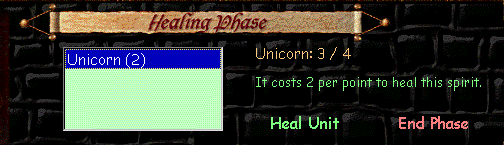
During the Healing Phase, any of your units that are able to heal themselves will appear in a dialogue box. If you have enough energy left, you will probably want to heal them. Select the unit you wish to heal by clicking its name in the list, and then clicking the words "Heal Unit."
After you have healed as many spirits as you can or want to, click the words "End Phase" in the lower right of the screen. This is technically the end of your turn, however, there is one more thing you will have to do before your next Activation Phase. |
|||
The Maintenance Phase |
|||
|
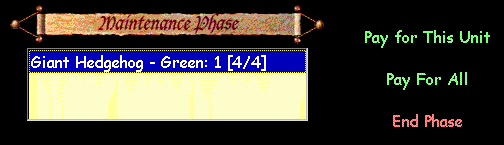
At this point in your turn, any energy units still in play will have added energy to your energy pool, so you should be able to pay the maintenance costs for all the listed units. You can do this quickly and easily by clicking the words "Pay For All." However, if you don't have enough energy to pay for all, or if you don't want to pay for all, you can pay the costs for individual units by clicking their name in the list and then clicking "Pay for This Unit."
After you have paid the maintenance for as many spirits as you can or want to, click the words "End Phase" in the lower right of the screen. That's it! Now you move on to the next turn and the game moves through the same cycle of phases until one player or the other wins.
|
|||